
Google Adsense Counter
[ chrome extension(chrome拡張機能)]
CONTENTS
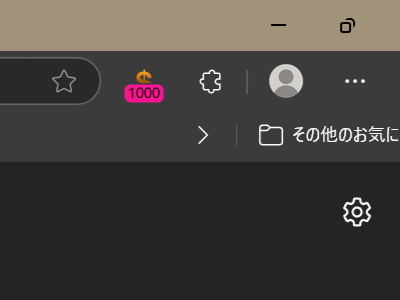
[Note: Automatically Translated Text] Refer to Google Adsense data (today's estimated revenue amount) and display that amount in the icon in the upper right corner of your browser. Whether you have a little or a lot, you must be wondering about the amount....... It is free.
Google Adsense データ(本日の推定収益額)を参照し、ブラウザの右上のアイコンにその金額を表示します。少ない人も多い人も、そりゃ気になりますよね、その額は‥。無料です。
Google Adsense データ(本日の推定収益額)を参照し、ブラウザの右上のアイコンにその金額を表示します。少ない人も多い人も、そりゃ気になりますよね、その額は‥。無料です。
Option Setting(オプション設定)
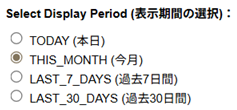
1. Google Adsense account id settings(Google Adsense アカウントidの設定)
Copy from the url when you open Google Adsense(Google Adsenseを開いたときのurlからコピーしてください)
https://www.google.com/adsense/new/u/0/pub-1234567890123456/home
Example(例):pub-1234567890123456
Copy from the url when you open Google Adsense(Google Adsenseを開いたときのurlからコピーしてください)
https://www.google.com/adsense/new/u/0/pub-1234567890123456/home
Example(例):pub-1234567890123456
[ note ]
- During installation, an authentication screen by google will appear.(初回インストール時、googleによる認証画面が出ます)
Install(インストール)
Install(インストール)
Then make the icon visible. The screen may vary depending on the browser.(その後、アイコンを見えるようにしてください。画面はブラウザによって多少異なります。)
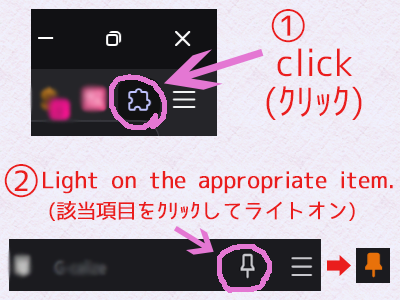

Then make the icon visible. The screen may vary depending on the browser.(その後、アイコンを見えるようにしてください。画面はブラウザによって多少異なります。)
[ Q/A ]
- No value is shown or 0.(数値が表示されていない、または0)
- It appears that you have never set the option settings. Right click on the icon and set the options.
オプション設定を一度も設定していないようです。アイコンを右クリックしてオプションを設定して下さい。
Operating Environment(動作環境)
2024.11.28
・Confirmed operation with chrome, and brave on window11.(window11にて、chrome,braveに於いて動作確認すみ)
Privacy Policy(プライバシーポリシー)
Data Collection
This extension does not collect any personal information or data from users. It does not ask for or store any personally identifiable information (e.g., name, email address, phone number).
Use of Data
If our extension accesses data on web pages, it is only to the extent necessary to provide the functionality. This data is used temporarily to assist in the operation of the web page and is not transmitted outside the extension or provided to any third party.
Data storage
The extension temporarily uses the data processed on the web page, but the data is processed temporarily on the terminal and is automatically deleted when the extension ends. No data is stored for the long term.
Sharing with third parties
The extension does not share data with third parties. All user data is processed in the local environment and is not leaked outside the extension.
Use of Cookies
The extension does not use cookies or other tracking technologies. It does not track browsing data or history.
User Rights
The user has the right to access, modify, and delete data collected by the extension. However, as mentioned above, the extension does not collect or store any personal information, so you will generally not receive any inquiries related to this.
Security
The extension uses state-of-the-art security measures to protect user data. Since no data is transmitted externally, it is safe from external threats.
Changes to our Privacy Policy
This Privacy Policy may be updated from time to time as necessary. If the policy changes, we will notify users and explain the changes in plain language.
Contact Us
If you have any questions or concerns about privacy, please contact us at: [mail]
This extension does not collect any personal information or data from users. It does not ask for or store any personally identifiable information (e.g., name, email address, phone number).
Use of Data
If our extension accesses data on web pages, it is only to the extent necessary to provide the functionality. This data is used temporarily to assist in the operation of the web page and is not transmitted outside the extension or provided to any third party.
- Data accessed: This extension accesses some elements of the user's Google Adsense website (Today's estimated revenue amount), but the data is only used to display in the browser icon.
Data storage
The extension temporarily uses the data processed on the web page, but the data is processed temporarily on the terminal and is automatically deleted when the extension ends. No data is stored for the long term.
Sharing with third parties
The extension does not share data with third parties. All user data is processed in the local environment and is not leaked outside the extension.
Use of Cookies
The extension does not use cookies or other tracking technologies. It does not track browsing data or history.
User Rights
The user has the right to access, modify, and delete data collected by the extension. However, as mentioned above, the extension does not collect or store any personal information, so you will generally not receive any inquiries related to this.
Security
The extension uses state-of-the-art security measures to protect user data. Since no data is transmitted externally, it is safe from external threats.
Changes to our Privacy Policy
This Privacy Policy may be updated from time to time as necessary. If the policy changes, we will notify users and explain the changes in plain language.
Contact Us
If you have any questions or concerns about privacy, please contact us at: [mail]